


Modern work requires more than just the cloud
The way you work has changed. You work in a hybrid environment, use multiple tools and expect everything to be available at all times. Cloud applications have become the standard. Yet in reality, your digital workplace often feels disconnected. You start your day in email, open different portals, search for files across multiple systems and constantly switch between applications. Everything runs in the cloud, but nothing feels like one seamless experience…
And you feel it. It costs you focus, and that’s already in short supply.
Fragmentation is in the experience, not the technology
The issue is rarely the applications themselves. Most tools do exactly what they’re supposed to do. The real challenge lies in how they come together in the daily experience of the user. When every application has its own entry point, fragmentation starts to appear. Employees have to remember where to go. IT loses visibility and control. Work starts to feel unnecessarily busy. In a world where work moves fast, teams are flexible and information lives everywhere, fragmentation becomes a real barrier to modern work.
A central digital workplace breaks this pattern. Not by adding another tool, but by bringing everything together.
What is a digital workplace, really?
A digital workplace is the starting point of your workday. It’s where you log in and where everything you need comes together. Applications, files and communication are all accessible from one environment. Access is based on roles and permissions, so you only see what’s relevant to you. That keeps the workspace clear and predictable.
And just as important: work doesn’t stop when you open an app. You stay within your work environment, aligned with how your organization operates, and the rules that they set.
This is what modern work looks like with a digital workplace
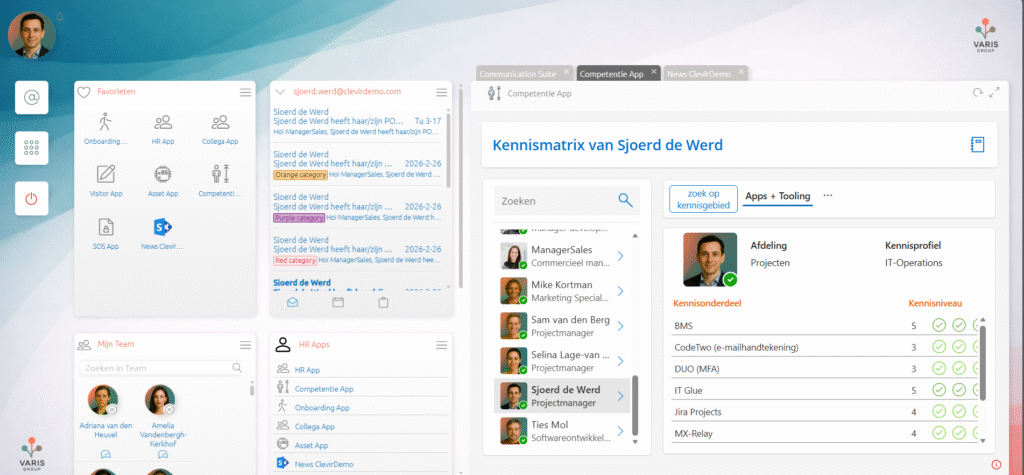
One central environment for all of your work
Clevir365 is an online workspace that brings clarity to everything people use throughout their day.
In many organizations, employees work across different applications and storage locations. Email lives in one place, files in another, internal tools somewhere else… and everyone creates their own shortcuts and workarounds.
This works when things are small. But as the number of systems grows, it quickly becomes overwhelming.
Clevir365 brings everything together in one central digital workplace in the cloud. Not by replacing existing systems, but by connecting them in a logical way. The workspace becomes the starting point of the workday.
Windows applications in the same workspace
Not every application is web-based. Many organizations still rely on Windows applications, such as ERP systems, industry-specific tools or legacy software that isn’t suited for the browser.
Within Clevir365, these applications are delivered through a ‘Virtual Desktop Infrastructure’ (VDI). Users launch them from the same portal as their cloud applications, without noticing any technical difference.
The experience stays consistent. There’s no need to switch context, log in separately or know where an application is running. Everything starts from one place.
This also removes the need for local workstations, fixed devices and complex installations. Employees can work from anywhere, on any device, with access to the same applications and data.
For IT, this means centralized control and security. For users, it simply feels like one cohesive digital workplace.
Only see what’s relevant to you
What you see in Clevir365 is based on your role and permissions within the organization. You only get access to the applications, data and information that are relevant to you.
This prevents users from getting lost in systems they don’t need and makes it clear where to go.
After logging in, you see a clear overview of all the applications you have access to (both web applications and internal systems). Access and authentication are centrally managed.
Communication and collaboration
A digital workplace is more than access to applications. It’s also where communication comes together.
Within Clevir365, the portal acts as a central hub for internal communication, updates and team collaboration. Employees don’t just find their tools here, but also what’s happening within the organization and their teams.
Through widgets and integrated components, news, notifications and team updates are visible directly in the workspace.
No separate intranet to navigate to – information appears where you work. That lowers the barrier and ensures information is actually seen and used.
A workspace you can shape yourself
Clevir365 isn’t static. Users can decide what matters most and give it a fixed place. Frequently used applications can be marked as favorites, and information can be displayed through widgets.
Think of calendars, tasks, team updates or internal applications. This creates a personal start page that fits the way you work – without adding complexity.
Files in one place with CDrive
Files are often scattered across different storage locations. CDrive brings them together into one central view within the digital workplace.
This allows users to work with their files from one environment, without having to think about where something is technically stored.
The underlying systems – such as Teams, SharePoint or other storage solutions – remain in place, but the experience becomes simpler and more intuitive.
Management and configuration for organizations
For administrators, Clevir365 provides control and clarity. Each portal can be configured to define how users log in, who has administrative rights and how the environment is structured.
The interface can be aligned with the organization’s branding, and applications and services are centrally managed.
This keeps the digital workplace consistent and manageable, even as the organization grows.
Why choose a digital workplace with Clevir365?
- One central access point for applications and information
- Less switching, less searching
- More visibility for both users and IT
- Seamless integration with existing systems
- Flexible and scalable
In short
A digital workplace isn’t about technology. It’s about clarity and simplicity.
By bringing applications, communication and information together in one environment, daily work becomes calmer and more structured. Employees work from one familiar place and no longer have to think about where things are or which tool to use.
With Clevir365, the digital workplace becomes a logical whole that grows with your organization, and actually makes work easier.
Users work with their cloud applications directly within the portal. Web-based applications open inside the workspace, without needing to leave it.
This means less switching, less context loss and more focus during the workday. At the same time, there’s flexibility. Applications can also be opened in a pop-out view when that better suits the task or screen setup.
You stay in control, while the digital workplace remains one cohesive experience.
Interested in Clevir365? Feel free to get in touch.